
Builder Design Pattern Introduction
Building complex objects one element at a time step-by-step until complete

Introduction
The Builder Design Pattern helps you construct complex objects step-by-step—while keeping your code flexible, readable, and decoupled. Unlike other creational patterns, Builder focuses on how something is built, not just what is built.
In this post, I’ll introduce the Builder Pattern using the original Gang of Four (GoF) explanation and compare it with several modern interpretations. Whether you’re revisiting Builder or learning it for the first time, you’ll hopefully come away with a basic understanding about how it works. I’ll expand upon the pattern in more detail in subsequent Builder blog entries.
I Thought I Understood the Builder Pattern
I thought I understood the Builder Pattern, but as I continued to think about it for this blog entry and review other sources, I realized that I didn’t quite have the full picture myself. This is one of the benefits of trying to explain something to someone else. You gain a better understanding of it yourself.
Builder is the second design pattern featured by the GoF, and it comes directly after Abstract Factory. It has several parts, and it can be challenging to comprehend just as Abstract Factory was challenging to comprehend.
I’ll start with a ChatGPT generated summary of the GoF’s Builder Pattern content followed by a brief summary of others before venturing into my own understanding of it.
A ChatGPT Summary of the GoF’s Builder Pattern
The following is a summary created by ChatGPT based upon the GoF’s Builder Pattern content, which I copied from their book. The diagrams are my reproductions of their diagrams taken from their book.
Builder Pattern Summary (Gang of Four)
Intent
Separate the construction of a complex object from its representation, so the same building process can create different representations.
Why Use It?
Imagine a document reader (like for RTF) that can output different formats—plain text, TeX, or a UI text widget. Rather than hardcoding all those output styles into the reader, Builder lets you separate the parsing logic (what the reader does) from how the output is generated (what format you want).
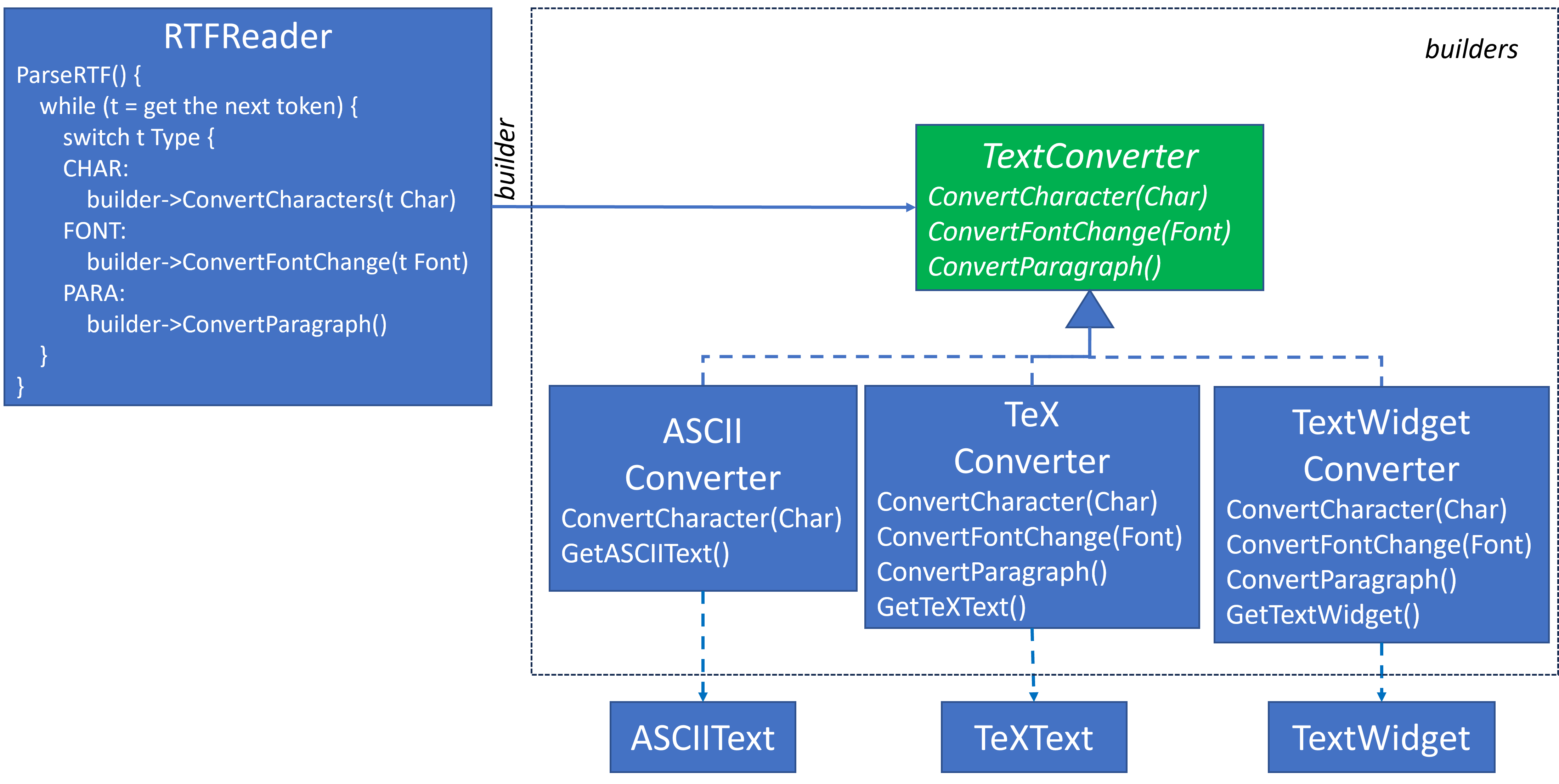
Key Components
- Builder (interface) – Defines steps for building the product (e.g.,
convertText,convertFont, etc.). - ConcreteBuilder – Implements the steps to build a specific representation (e.g., ASCII, TeX, UI widget).
- Director – Orchestrates the building process using the builder. (e.g.,
RTFReaderreads and delegates token handling to the builder.) - Product – The final result being built (e.g., plain text, widget object, etc.).
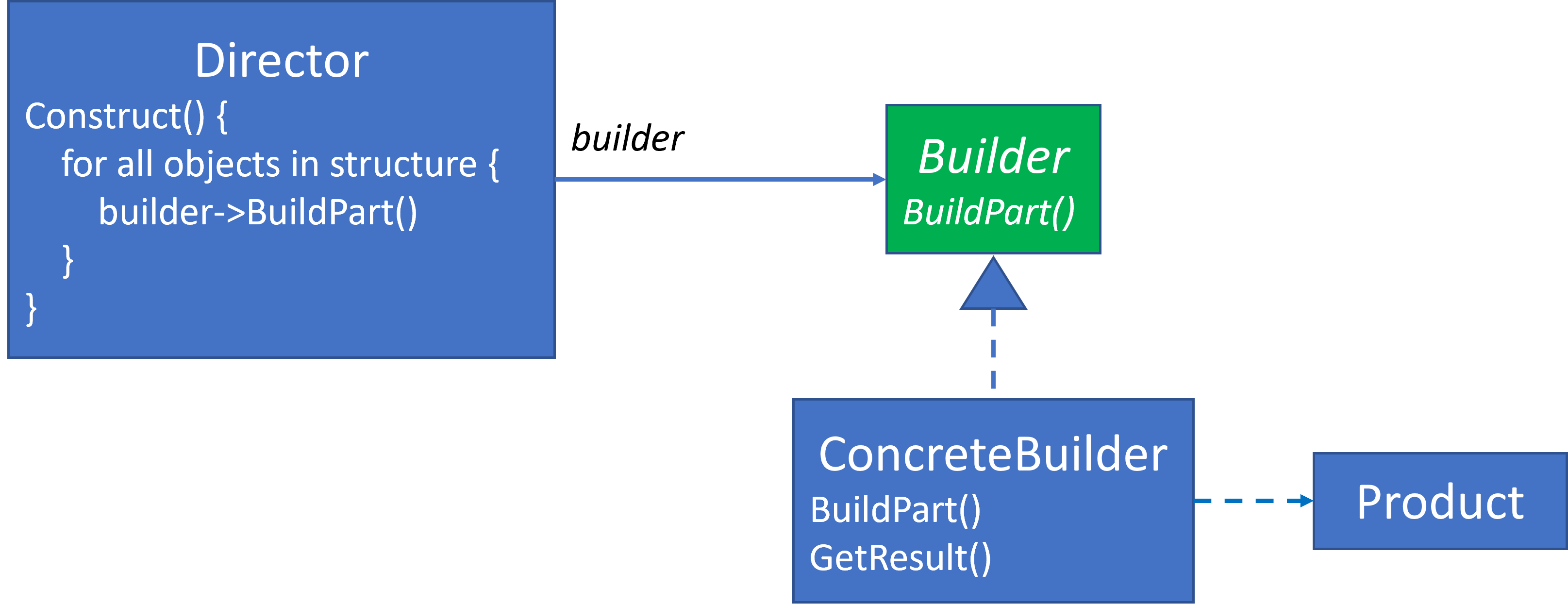
How It Works
- Client configures a Director with a specific Builder.
- The Director parses input and tells the Builder what to build.
- The Builder gradually assembles the Product.
- The Client retrieves the finished product from the Builder.

Benefits
- ✅ Flexible Output: Easily swap out how the object is built without changing the parsing/creation logic.
- ✅ Encapsulation: Construction and representation details are hidden inside the builder.
- ✅ Fine Control: The object is built step-by-step, which allows for precise customization.
When to Use It
- You need to build complex objects made of multiple parts.
- The same construction process needs to produce different outputs.
- You want to hide or isolate construction logic from the object’s representation.
Real-Life Examples
- Document Converters – Convert formats like RTF to HTML, PDF, or plain text.
- UI Builders – Build forms/layouts in different platforms.
- Game Level Builders – Create mazes, rooms, or game worlds with different themes.
- Compilers/Parsers – Convert code into abstract syntax trees or bytecode.
Builder vs. Abstract Factory
| Builder | Abstract Factory |
|---|---|
| Builds one complex object | Builds families of objects |
| Constructed step-by-step | Constructed in one go |
| Focuses on construction logic | Focuses on object families |
In Code Terms
Think of Director as a loop or parser walking through input, and Builder as a strategy object that responds to each “event” to gradually construct a result.
Director director = new RTFReader();
Builder builder = new TeXConverter();  // or ASCIIConverter, etc.
director.parse(document, builder);
Product output = builder.getResult();
Summary
This pattern shines when your creation process involves multiple steps, and the output format may vary—but the steps themselves remain largely the same.
Intent of the Builder Design Pattern as Presented by Others
Even the ChatGPT summary description is a bit overwhelming. Before venturing into my interpretation of Builder, let’s look at the intent provided by several other references.
Wikipedia Builder Pattern
From the Wikipedia Builder Overview
The builder design pattern solves problems like:
- How can a class (the same construction process) create different representations of a complex object?
- How can a class that includes creating a complex object be simplified?
Creating and assembling the parts of a complex object directly within a class is inflexible. It commits the class to creating a particular representation of the complex object and makes it impossible to change the representation later independently from (without having to change) the class.
The builder design pattern describes how to solve such problems:
- Encapsulate creating and assembling the parts of a complex object in a separate Builder object.
- A class delegates object creation to a Builder object instead of creating the objects directly. A class (the same construction process) can delegate to different Builder objects to create different representations of a complex object.
Source Making Builder
- Separate the construction of a complex object from its representation so that the same construction process can create different representations.
- Parse a complex representation, create one of several targets.
Refactoring Guru Builder
Builder is a creational design pattern that lets you construct complex objects step by step. The pattern allows you to produce different types and representations of an object using the same construction code.
DevIQ Builder
The Builder design pattern is a creational pattern, similar to the Factory pattern (Factory Method, Abstract Factory). Unlike the Factory pattern, which typically only offers one method for creating an object, the Builder pattern offers multiple methods that can be used to gradually define the characteristics of the type to be created. This provides a more flexible interface than a single method with a large number of parameters or a complex parameter object.
Complex Object
The word complex appears in each of the above descriptions, including the GoF’s original description.
What is a complex object? It’s an object with optional elements, repeating elements and/or an assemble of various elements.
The GoF features MazeBuilder as a complex object in their sample code. MazeBuilder, an abstract interface, allows the client code to build a Maze by adding Rooms to the Maze one at a time and connecting pairs of Rooms together via a Door. MazeBuilder supports the construction of a Maze of any size, or complexity, from a single Room to thousands of Rooms with connecting Doors. Their Maze is a undirected graph, but within the context of a game setting. Here’s a Java example:
interface MazeBuilder {
    void addRoom(int room); // Rooms have unique integer identifiers.
    void addDoor(int room1, int room2); // Add a door between two rooms.
}
They define two concrete MazeBuilder classes, StandardMazeBuilder and CountingMazeBuilder. StandardMazeBuilder fulfills the MazeBuilder interface contract by acquiring Room objects and connecting them via Door objects, much like a graph acquiring nodes and connecting them via edges. CountingMazeBuilder simply counts the number of Rooms and Doors that are declared in the Maze construction.
Here’s the basic structure of each concrete class. Both implement addRoom and addDoor as required by MazeBuilder. However, each returns a different Product. StandardMazeBuilder returns a Maze; whereas, CountingMazeBuilder returns an int.
class StandardMazeBuilder implements MazeBuilder {
    public void addRoom(int room) {...}
    public void addDoor(int room1, room2} {...}
    public Maze getMaze() {...}
}

class CountingMazeBuilder implements MazeBuilder {
    public void addRoom(int room) {...}
    public void addDoor(int room1, room2} {...}
    public int getMazeCount() {...}
}
A Few Real World Examples
I asked ChatGPT for a few real world examples of Builder. Here are several examples it provided with some code examples where we see in each example how details are added one at a time in a chain with the last method returning the class type being built. These examples are not constructing complex objects via an iterated specification, but that’s not required for Builder even if the GoF’s description featured it.
StringBuilder
Here is a StringBuilder Tutorial along with a quick example:
String result = new StringBuilder()
    .append("Hello")
    .append(", ")
    .append("world!")
    .toString();
ProcessBuilder
Here is a ProcessBuilder Tutorial along with a quick example:
Process process = new ProcessBuilder("ping", "google.com")
  .redirectErrorStream(true)
  .start();
HttpRequestBuilder
Here is a HttpRequestBuilder Tuturial along with a quick example:
HttpRequest request = HttpRequest.newBuilder()
  .uri(new URI("https://postman-echo.com/get"))
  .GET()
  .build();
Building Builder a Little at a Time
I introduced Abstract Factory in phases. I’ll do the same with Builder. As the Builder design gets more sophisticated, it will be able to handle more complex objects.
I will continue with more Builder content in subsequent blog entries. Here’s a preview of what I’ll be presenting.
Builder consists of several basic mechanisms, which don’t all need to be present in a Builder design:
- Rather than initialize a complex object via an individual class constructor or Factory Method, initialize the complex object in parts via set accessor methods potentially implemented so that they can be chained together. This is the technique presented in the real-world examples above. See: Builder Design Pattern - Basic Implementation
- Rather than hardcoding the accessor method calls, initialize the complex object via a specification script that determines which method should be called for each script instruction. This expands the number of configurations available for complex objects to limitless options via an unchanging codebase. The only variable is the script, which could specify one element in the complex object to thousands of elements.
- Declare the set accessor methods in an interface and use the Strategy Design Pattern to declare multiple concrete classes that from the interface, so that different class types can be constructed based upon the same serialized construction.
- Once the complex object has been constructed, acquire a single object that encapsulates the complexity from the client code that accesses it.
Summary
Builder helps you create complex objects in a step-by-step process without coupling your construction logic to specific object representations. This decoupling gives you more flexibility and reusability—especially when multiple output formats or object variations are needed.
In upcoming posts, I’ll build a custom Builder example one layer at a time, much like I did with Abstract Factory. We’ll start simple and grow into more powerful and flexible forms of the pattern.
References
- Builder Design Pattern via Wikipedia
- Builder Design Pattern via Source Making
- Builder Design Pattern via Refactoring Guru
- Builder Design Pattern via DevIQ
- Builder Design Pattern via Digital Ocean
- Design Patterns - Builder Blog from Russ Hammett
- Builder Design Pattern Blog from Srishti Prasad
- Exploring Joshua Bloch’s Builder design pattern in Java Java Magazine Article by Frank Kiwy
- Builder Design Pattern Explained in 10 Minutes Video by Kantan Coding
- Builder Pattern (Gang of Four Design Patterns Series) Video by Wes Doyle
- Google Search: Builder Design Pattern
- Google Video Search: Builder Design Pattern Video