
WORK IN PROGRESS – Prototype Design Pattern Use Case
Demonstrating a Prototype Design in the Context of a Drawing Program
Introduction
I introduced the Prototype Design Pattern in my previous blog entry. Prototype is a Creational Design Pattern that’s different from the other creational design patterns. Most creational patterns involve a static method invoking the constructor of the concrete class type they’re instantiating. This means that they have knowledge of and depend upon that concrete class type. Should there be any class type updates to the design, then the creational pattern implementation will need to be updated.
Prototype instantiates a new instance by invoking a method of an object without having to know the object’s concrete class type. This object method is responsible for returning an instance of its own class for which it has this knowledge. This object method vs static method invocation is what allows the implementation to be more flexible to class type updates and is what separates Prototype from it fellow creational patterns.
This blog entry continues with Prototype with a Drawing Program Use Case example, much like what PowerPoint provides to render shapes.
Drawing Program Use Case
I render my UML class diagrams in PowerPoint. I mentioned this in a previous blog entry where I presented My Design Process. PowerPoint has its advantages and disadvantages as a design tool, but I found that it has been sufficient for my needs. PowerPoint’s Drawing feature allows me to create shapes, connect them, color them, add/edit text, etc. Almost every UML class diagram in my blog entries has been rendered using PowerPoint.
This Prototype Use Case will sketchout a design and implementation for some of the features of a drawing tool. It will include:
- A skeleton design and implementation for a drawing tool illustrating the basic shape organization structure.
- Using a Prototype and Prototype Registry to acquire
Shapeobjects by name. This allows new concreteShapetypes to be added without having to update the Prototype portion of the design. The only addition required is to register a breeder object of the new type. - The ability to group
Shapestogether, such as one can do with the Group feature in PowerPoint. - The ability make copies of any
Shapessuch as one can do with Copy-and-Paste in PowerPoint.
In addition to Prototype/Prototype-Registry, this design will also feature elements of Strategy, Template Method, Factory Method and Composite.
I will present the design starting with a Shape contract and then expand the design into extending classes.
The implementation includes details that are not presented in the UML class diagrams. Keep this in mind when comparing them. The implementation takes precidence over the design.
I’m also fond of declaring attributes and methods as final when possible. Since the design features Template Method, I want to ensure that extending classes don’t violate Template Method behaviors by overriding them, even if unintentionally.
Shape
The contract is declared in Shape.
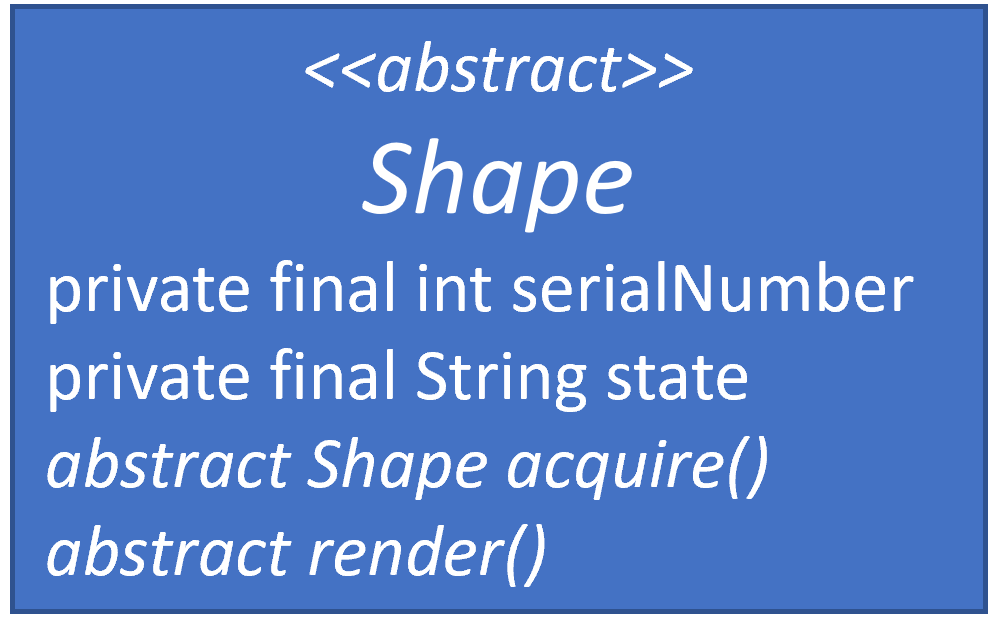
I chose an abstract class rather than an interface, because I want to store information in Shape along with some implementation. It’s easier to do that when it’s an abstract class rather than an interface.
Shape only does two things in this design:
- It acquires a copy of itself
- It renders itself
In a real drawing tool, there would be more behavior and state, such as:
- Position
- Rotation
- Line and Fill formatting
- Optional Text with its own formatting
- Etc.
The Shape implementation contains some state:
serialNumberwhich is an incrementing integer for each newly acquiredShapeobject. I’ve added it to demonstrate that new objects are being instantiated as they are acquired.statewhich is a placeholder for state within the object. In a production drawing program, state would include position, rotation, formatting details, etc. In my simple demo, it’s a simple String.
This demo won’t render any images. Text will be a substitute for rendering if this were an actual drawing program. Rendering in this demo is closer to a sophisticated toString() feature, which leverages the Template Method.
TBD
Registered Breeder
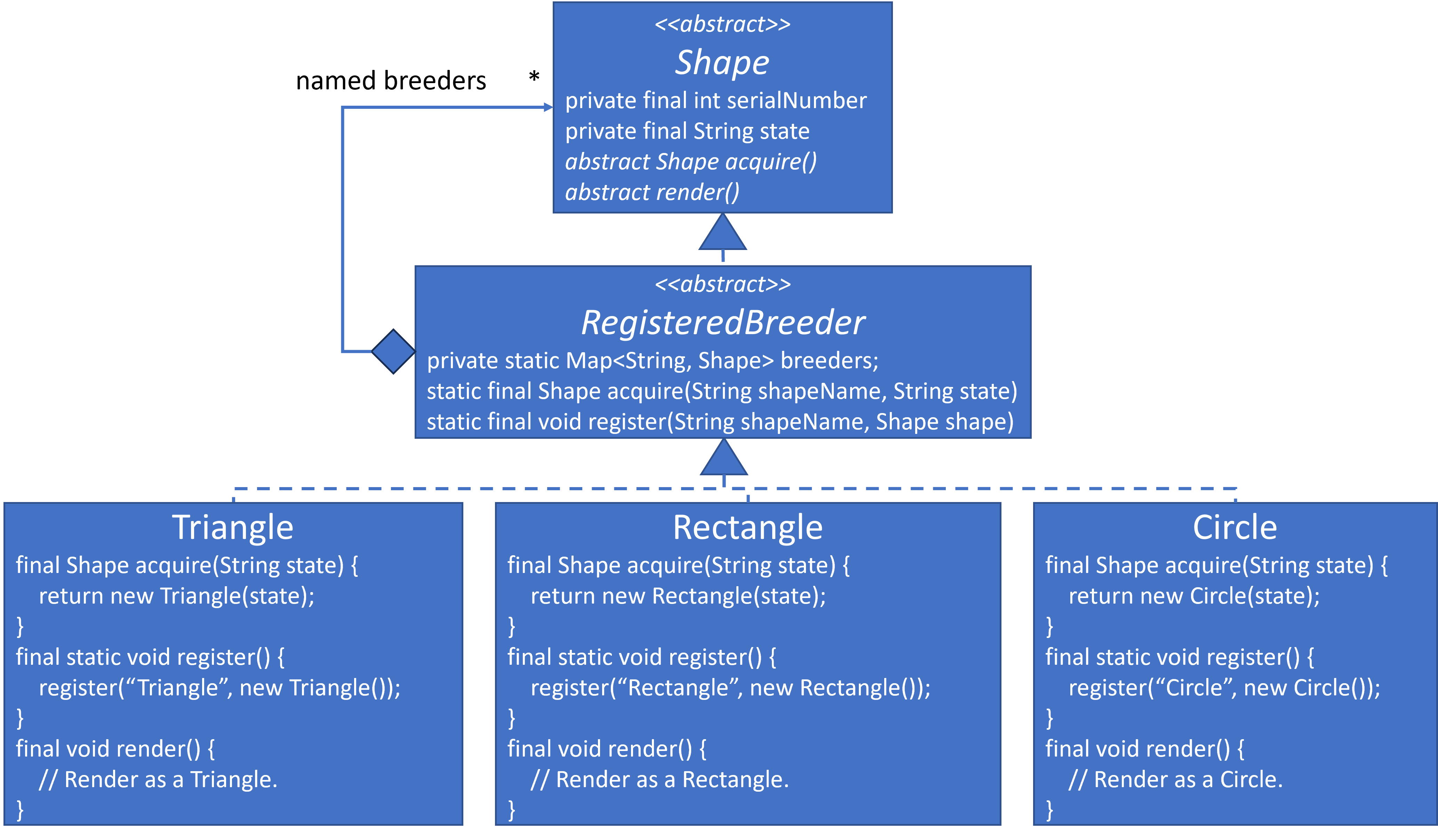
The design expands to include RegisteredBreeder. It is a Prototye Registry. I contemplated naming it RegisteredShapeBreeder, but this felt too long. Maybe RegisteredShape would be a better name. Naming things is hard.
It throws an exception if a breeder is not found, and it also throws an exception if a newly RegisteredBreeder use the same key of an existing RegisteredBreeder.
The design mirrors the basic Prototype design from the previous blog entry.

TBD
Concrete Classes

This design expansion adds concrete classes to the previous abstract classes. They include: Triangle, Rectangle and Circle. I wasn’t thinking of Squid Game when I chose these shapes, but similarity is pretty striking.
The design easily expands to accommodate these concrete classes:
Here are their implementation:
TBD
A breeder object for each type must be registered. Here’s the registration code:
TBD
Acquiring and Rendering Shapes
I created a ShapeFactory to shield the application from interacting with the RegisteredBreeder class directly.
TBD
Here is some sample code to acquire and render shapes;
TBD
Composite Shapes
This extension will expand beyond traditional Prototype and into Composite.
Composites will allow the design to group a set of Shape objects into a composite entity, which I’m calling Shapes in this design. Since Shapes extends Shape it must implement acquire and render as well. The design also includes ShapesFactory.
Here is the design:
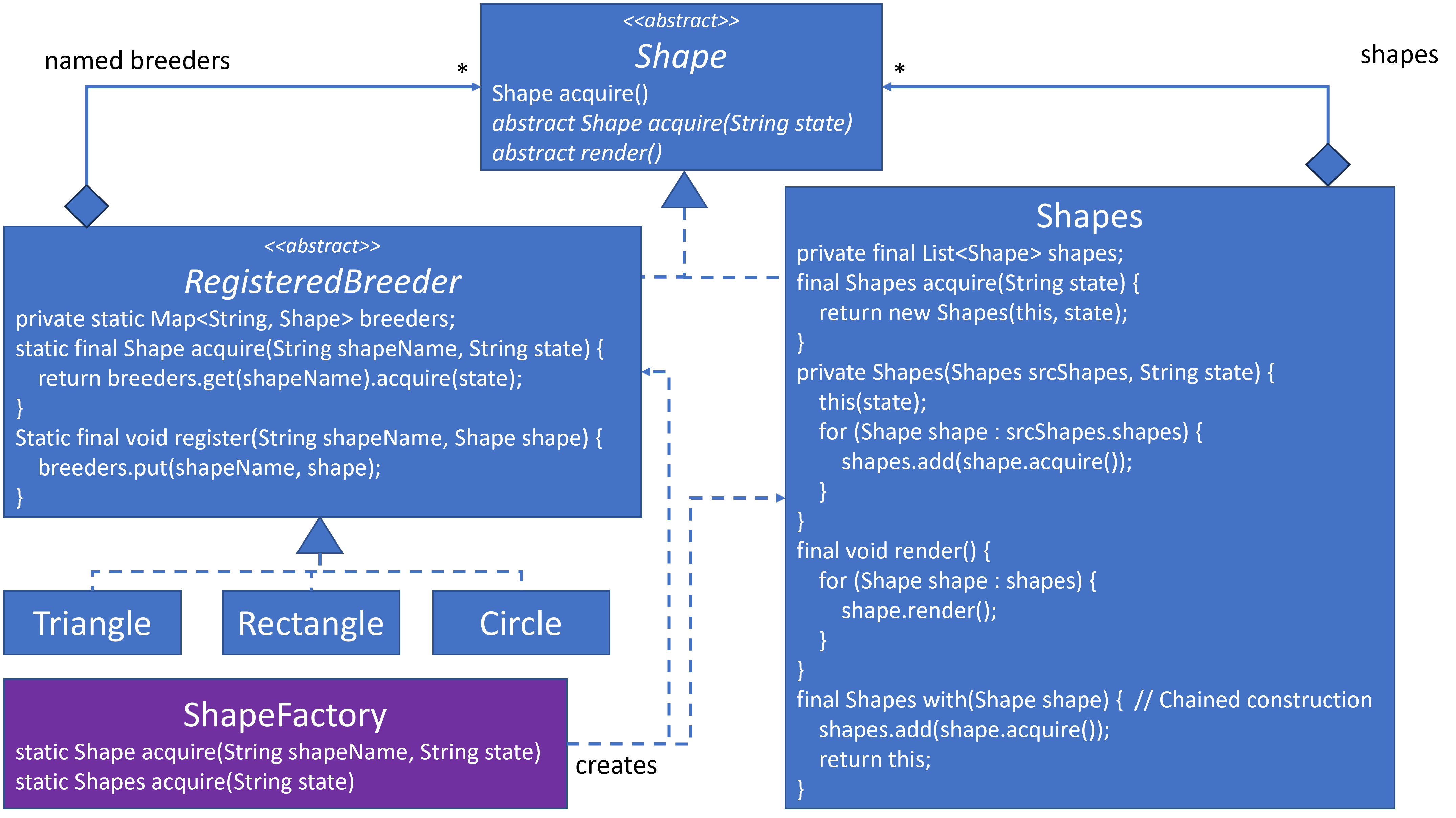
Notice that a Shape object can reside within RegisteredBreeder as well as Shapes. This can feel a bit disorienting as well, since I don’t think we’ve seen this type of relationship before. It’s fine because RegisteredBreeder maintains an object instance as part of the creational portion of the design, and Shapes maintains an object instance as part of the structural portion of the design.
I also noticed that when a shape is acquired in Shapes it tends to make a temporary copy, which is not used. It becomes orphaned immediately, which makes it a candidate for garbage collection. There may be a way to avoid this, but I didn’t investigate it.
Here is the implemenation for Shapes:
TBD
Here is the implementation for ShapeFactory:
TBD
Here is code that creates Shapes:
Non-Factory/Registry Acquisition
As mentioned in Acquisition via Object, once a Prototype object is acquired, we can acquire more objects from it.
Here are a few examples of acquiring a new object from an existing object:
TBD
Register Composites

Drawing programs often provide many basic shapes. I’ve shown that we can easily add Triangle, Rectangle and Circle. What if we want to provide more complex shape, such as the Olympic Rings?
Register Object Variances
Summary
TBD
References
TBD
Complete Demo Code
Here’s the entire implementation up to this point as one file. Copy and paste it into a Java environment and execute it. If you don’t have Java, try this Online Java Environment. Play with the implementation. Copy and paste the code into Generative AI for analysis and comments.
++++++++++++++++++++++++++++++++++++++++++++++++++++++++++++++++++
NOTES
- Copy entire composite structures.
- Closing thoughts. Creational Patterns are not mutually exclusive. A design may incorporate several of them. For example, in Composite trees, the non-terminal composite classes might be acquired via a Factory while the terminal leaf nodes could be acquired via a Singleton, if they are stateless. And Prototype could be used to make a copy of the entire composite structure as seen in the use case.