
Prototype Design Pattern Use Case
... where I realized that prototype registration is more than just one object for one class
Introduction
I introduced the Prototype Design Pattern in my previous blog entry. Prototype is a Creational Design Pattern that’s different from the other creational design patterns. Most creational patterns involve a static method invoking the constructor of the concrete class type they’re instantiating. This means that they have knowledge of and depend upon that concrete class type. Should there be any class type updates to the design, then the creational pattern implementation will need to be updated.
Prototype instantiates a new instance by invoking a method of an object without having to know the object’s concrete class type. This object method is responsible for returning an instance of its own class for which it has this knowledge.
Factories centralize change around construction logic. Prototype distributes it across the objects that already know how to reproduce themselves. This object-method invocation (rather than a static factory method) shifts construction knowledge from centralized code into the objects themselves. That shift is what allows Prototype to remain resilient to class evolution and separates it from its fellow creational patterns.
This blog entry continues with Prototype using a Drawing Program Use Case example.
Drawing Program Use Case
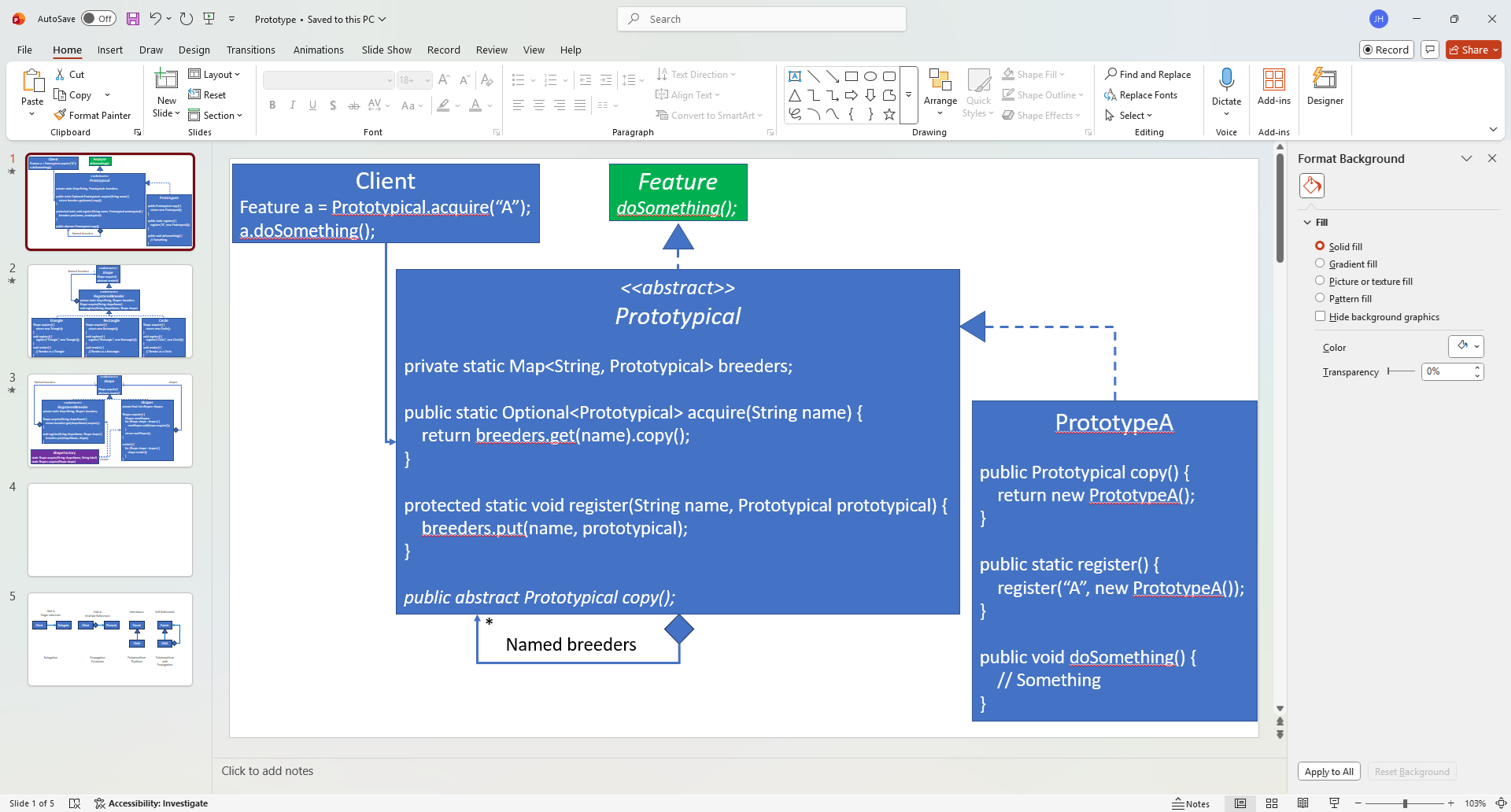
I render my UML class diagrams in PowerPoint. I mentioned this in a previous blog entry where I presented My Design Process. PowerPoint has its advantages and disadvantages as a design tool, but I found that it has been sufficient for my needs. PowerPoint’s Drawing feature allows me to create shapes, connect them, color them, add/edit text, etc. Almost every UML class diagram in my blog entries has been rendered using PowerPoint.
This Prototype Use Case will sketch out a design and implementation for some of the features of a drawing program. It will include:
- A skeleton design and implementation for a drawing program illustrating the basic
Shapeorganization structure. - A Prototype and Prototype Registry to acquire
Shapeobjects by name. This allows new concreteShapetypes to be added without having to update the Prototype portion of the design. The only addition required is to register a breeder object of the new type. - The ability to group
Shapestogether, such as one can do with the Group feature in PowerPoint. - The ability to make copies of any
Shapessuch as one can do with Copy-and-Paste in PowerPoint.
In addition to Prototype/Prototype Registry, this design will also feature elements of Strategy, Template Method, Factory Method and Composite.
I will present the design starting with a Shape contract and then expand the design with extending classes as it progresses.
The code examples include details that are not presented in the UML class diagrams. Keep this in mind when comparing them. The implementation takes precedence over the design, and the UML diagrams are intended to explain structure. They are not a complete specification.
I’m also fond of declaring attributes and methods as final when possible. Since the design features Template Method, I want to ensure that extending classes don’t violate Template Method behaviors by overriding them, even if unintentionally. This becomes important later when composites and registries interact, and without final, subtle overrides could silently violate Prototype acquisition semantics while still compiling correctly.
Shape
The contract is declared in Shape.
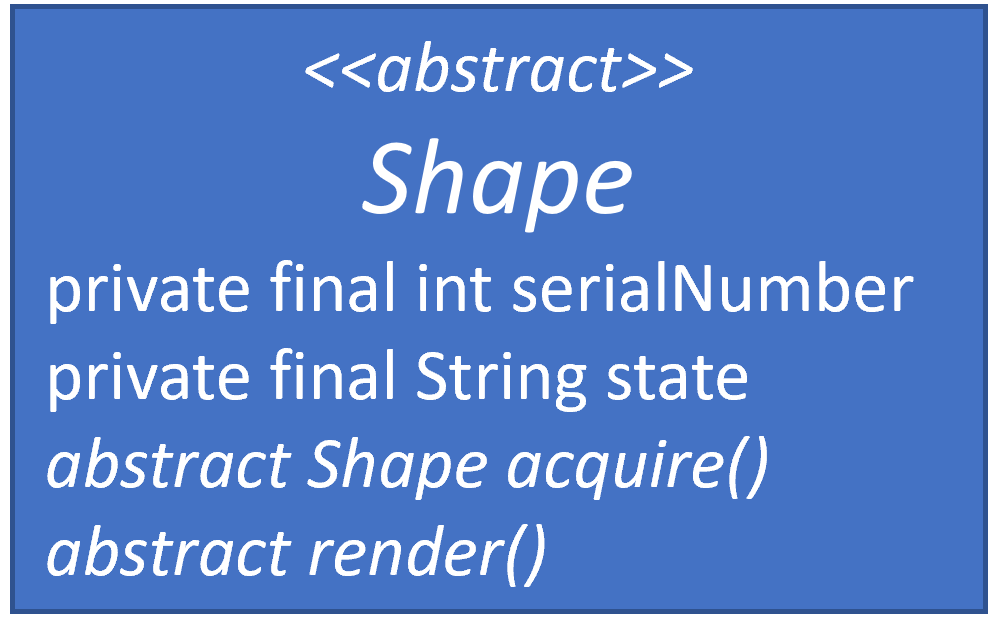
I chose an abstract class rather than an interface, because I want to store information in Shape along with some implementation. It’s easier to do that when it’s an abstract class rather than an interface.
Shape only does two things in this design:
- It acquires a new instance of itself
- It renders itself
In a real drawing program, there would be more behavior and state, such as:
- Position
- Rotation
- Expansion and Contraction
- Line and Fill formatting
- Optional Text with its own formatting
- Etc.
The Shape implementation contains private attributes:
serialNumberwhich is an incrementing integer for each newly acquiredShapeobject. I’ve added it to demonstrate that new objects are being instantiated as they are acquired. It exists only to demonstrate that new objects are being created when acquired and should not be interpreted as part of a production-quality identity or lifecycle mechanism.statewhich is a placeholder for state within the object. In a production drawing program, state would include position, rotation, formatting details, etc. In my simple demo, it’s a String.
This demo won’t render any images. Text content will be a substitute for rendering in the demo. Rendering in this demo is closer to a sophisticated toString() feature, which leverages the Template Method.
abstract class Shape {
    // Each newly created object will have a unique serialNumber initialized from an incrementing serialCounter.
    // It exists only to demonstrate that new objects are being created when acquired.
    private static int serialCounter = 0;
    private final int serialNumber;

    // Each object has a state, which will be copied from the breeder when a new object is acquired.
    // It exists to demonstrate that new objects are created via a deep copy.
    // It's a representational placeholder for all possible Shape state information.
    private final String state;

    protected Shape(String state) {
        this.serialNumber = serialCounter++;
        this.state = state;
        // Printing only to demonstrate that a Shape object is being created.
        System.out.format("Creating Shape serialNumber=%d, state=%s\n", serialNumber, state);
    }

    public final Shape acquire() {
        return acquire(state);
    }

    // Delegate state acquisition to extending classes.
    protected abstract Shape acquire(String state);

    // This example isn't rendering shapes. It demonstrates where they could be rendered.
    // This version of render() is closer to toString().
    public final void render() {
        render(0);
    }

    // Delegate indented rendering to extending classes.
    protected abstract void render(int indentation);

    protected final String getIndentation(int indentation) {
        return " ".repeat(indentation);
    }

    protected final String getShapeDetails() {
        return String.format("serialNumber=%d, state=%s", serialNumber, state);
    }
}
Registered Breeder
The design expands to include RegisteredBreeder. It is a Prototype Registry. I contemplated naming it RegisteredShapeBreeder, but this felt too long. Maybe RegisteredShape would be a better name. Naming things is hard.
A RegisteredBreeder is not a factory; it is a named prototype root capable of acquiring equivalent objects.
It throws an exception if a breeder is not found, and it also throws an exception if a newly RegisteredBreeder uses the same key of an existing RegisteredBreeder.
The design mirrors the basic Prototype design from the previous blog entry.

abstract class RegisteredBreeder extends Shape {
    private static final Map<String, Shape> breeders = new ConcurrentHashMap<>();

    public RegisteredBreeder(String state) {
        super(state);
    }

    // Acquire the breeder, and return an object acquired from the breeder object.
    // Pass its state information so the breeder can initialize the new object with it.
    public static final Shape acquire(String shapeName, String state) {
        Shape breeder = breeders.get(shapeName.toLowerCase());
        if (breeder == null) {
            throw new IllegalArgumentException("No breeder registered for: " + shapeName);
        }
        return breeder.acquire(state);
    }

    // Register the breeder known by its shape name.
    protected static final void register(String shapeName, Shape breeder) {
        if (breeders.containsKey(shapeName.toLowerCase())) {
            throw new IllegalArgumentException("Registration exists for: " + shapeName);
        }
        // Printing only to demonstrate that a Shape object is being registered.
        System.out.format("Registering %s Shape\n", shapeName);
        breeders.put(shapeName.toLowerCase(), breeder);
    }

    @Override
    public final void render(int indentation) {
        System.out.format("%sRender a %s(%s)\n", getIndentation(indentation), getShapeName(), getShapeDetails());
    }

    protected abstract String getShapeName();
}
Concrete Classes

This design expansion adds concrete classes to the previous abstract classes. They include Triangle, Rectangle, and Circle. I wasn’t thinking of Squid Game when I chose these shapes, but I have been watching the reality version of the show recently.
The design easily expands to accommodate these concrete classes:
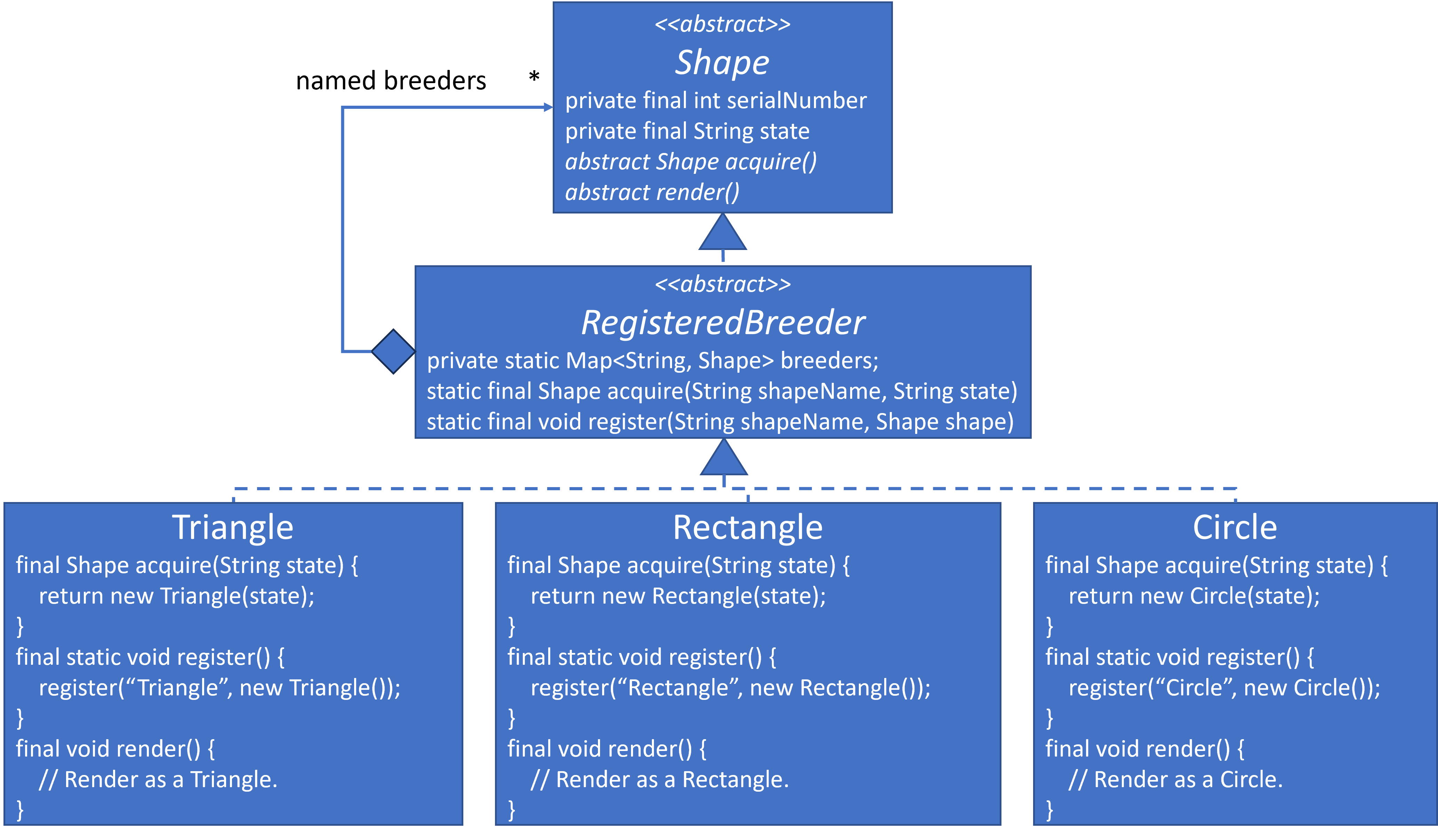
Here are their implementations.
NOTE: This is one of the UML/Implementation differences I mentioned previously. The UML places render() in the concrete classes, but in the final implementation, render() resides in RegisteredBreeder with support from the concrete classes via getShapeName():
class Triangle extends RegisteredBreeder {
    private final static String SHAPE_NAME = "Triangle";

    private Triangle(String state) {
        super(state);
    }

    @Override
    public final Shape acquire(String state) {
        return new Triangle(state);
    }

    public final static void register() {
        register(SHAPE_NAME, new Triangle("Breeder Triangle"));
    }

    @Override
    protected final String getShapeName() {
        return SHAPE_NAME;
    }
}

class Rectangle extends RegisteredBreeder {
    private final static String SHAPE_NAME = "Rectangle";

    Rectangle(String state) {
        super(state);
    }

    @Override
    public final Shape acquire(String state) {
        return new Rectangle(state);
    }

    public final static void register() {
        register(SHAPE_NAME, new Rectangle("Breeder Rectangle"));
    }

    @Override
    protected final String getShapeName() {
        return SHAPE_NAME;
    }
}

class Circle extends RegisteredBreeder {
    private final static String SHAPE_NAME = "Circle";

    private Circle(String state) {
        super(state);
    }

    @Override
    public final Shape acquire(String state) {
        return new Circle(state);
    }

    public final static void register() {
        register(SHAPE_NAME, new Circle("Breeder Circle"));
    }

    @Override
    protected final String getShapeName() {
        return SHAPE_NAME;
    }
}
A breeder object for each type must be registered. Here’s the registration code:
Triangle.register();
Rectangle.register();
Circle.register();
Acquiring and Rendering Shapes
I created a ShapeFactory to shield the application from interacting with the RegisteredBreeder class directly.
class ShapeFactory {
    private ShapeFactory() {}

    public static final Shape acquire(String shapeName, String state) {
        return RegisteredBreeder.acquire(shapeName, state);
    }
}
Here is some sample code to acquire and render shapes:
System.out.println("\nAcquire and Render Triangle A ->");
Shape triangleA = ShapeFactory.acquire("Triangle", "A");
triangleA.render();

System.out.println("\nAcquire and Render Triangle B ->");
Shape rectangleB = ShapeFactory.acquire("Rectangle", "B");
rectangleB.render();
Composite Shapes
This next extension will expand beyond traditional Prototype and into Composite.
Composites will allow the design to group a set of Shape objects into a composite entity, which I’m calling Shapes in this design. Since Shapes extends Shape it must implement acquire and render as well. ShapesFactory extends to accommodate Shapes.
Shapes doesn’t add new rendering features or new individual shapes. It’s a structural class that allows us to group other Shape objects and treat them as a single entity. Its acquire and render implementations propagate acquisition and rendering to the Shape objects grouped within it.
Shapes groups individual Shape objects. Since Shapes extends Shape, this means that Shapes can contain Shapes. Since Shapes can contain any number of Shape objects, and Shapes can contain Shapes, a single composite object tree is unbounded in width or depth. The self-referential definition means that the acquire and render are recursive calls, so all objects in the composite tree will be acquired or rendered when executed from the tree root object.
It’s astounding how so much can be accomplished with so little code. This works because Prototype and Composite share the same abstraction: acquisition and rendering propagate naturally through the object tree.
Here is the design:
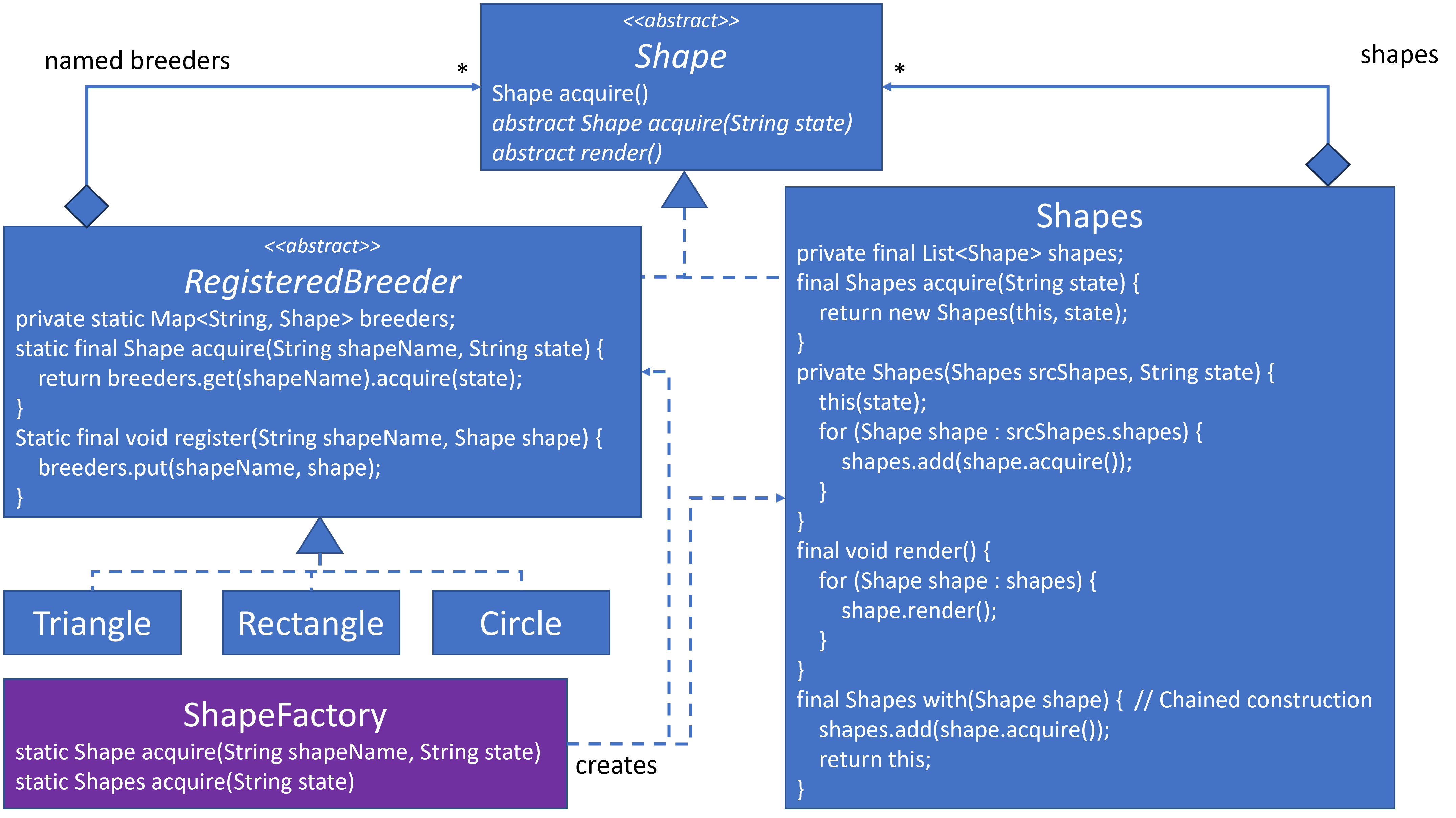
Notice that a Shape object can reside within RegisteredBreeder with a HAS-A relationship as well as reside within Shapes with its own HAS-A relationship. This can feel a bit disorienting, since I don’t think we’ve seen this type of double HAS-A relationship before. It’s fine because RegisteredBreeder maintains an object instance as part of its registry, and Shapes maintains an object instance as part of the structural behaviors.
The Shapes with(Shape shape) method returns a reference to this so that Shape objects can be added via chaining.
I also noticed that when a Shape is acquired in Shapes it tends to make a temporary copy, which is not preserved. It becomes orphaned immediately, which makes it a candidate for garbage collection. This design intentionally prioritizes correctness and clarity over allocation minimization. A production system might optimize this, but doing so would obscure the intent of acquisition semantics.
Here is the implementation for Shapes:
// This class maintains a composite of Shapes instances.
class Shapes extends Shape {
    private final List<Shape> shapes = new LinkedList<>();

    public Shapes(String state) {
        super(state);
    }

    // Initialize the new Shapes object with a deep copy of Shape objects within the source composite.
    private Shapes(Shapes sourceShapes, String state) {
        this(state);
        for (Shape shape : sourceShapes.shapes) {
            shapes.add(shape.acquire());
        }
    }

    @Override
    public final Shapes acquire(String state) {
        return new Shapes(this, state);
    }

    // Returning this Shapes object so that calls to with can be chained.
    public final Shapes with(Shape shape) {
        shapes.add(shape.acquire());
        return this;
    }

    // Render this object and propagate rendering to the composite shapes while increasing indentation.
    // Indentation exists only to show nesting when "rendering" Shape objects.
    @Override
    public final void render(int indentation) {
        System.out.format("%sRender Shapes(%s):\n", getIndentation(indentation), getShapeDetails());
        for (Shape shape : shapes) {
            shape.render(indentation + 1);
        }
    }
}
Here is the complete implementation for ShapeFactory, which includes the ability to acquire Shapes:
class ShapeFactory {
    // Shield the application from having to know whether to acquire
    // from the registry or from a composite directly.
    private ShapeFactory() {}

    public static final Shape acquire(String shapeName, String state) {
        return RegisteredBreeder.acquire(shapeName, state);
    }

    public static final Shapes acquire(String state) {
        return new Shapes(state);
    }
}
Here is code that creates and renders Shapes:
System.out.println("\nAcquire and Render Shapes C, with acquired copies of Triangle A and Triangle B");
Shapes shapesC = ShapeFactory.acquire("C")
    .with(triangleA)
    .with(rectangleB);
shapesC.render();

System.out.println("\nAcquire and Render Shapes E, with an acquired deep copy of Shapes D ->");
Shapes shapesE = ShapeFactory.acquire("E")
    .with(shapesD);
shapesE.render();

System.out.println("\nAcquire and Render Shapes G, with Triangle H and Shapes I with Triangle J and Rectangle K ->");
Shapes shapesG = ShapeFactory.acquire("G")
    .with(ShapeFactory.acquire("Triangle", "H"))
    .with(ShapeFactory.acquire("I")
        .with(ShapeFactory.acquire("Triangle", "J"))
        .with(ShapeFactory.acquire("Rectangle", "K")));
shapesG.render();
Non-Factory/Registry Acquisition
As mentioned in Acquisition via Object, once a Prototype object is acquired, we can acquire more objects from it.
Here are a few examples of acquiring a new object from an existing object:
System.out.println("\nAcquire and Render Shapes D, with an acquired deep copy of the contents of Shapes C ->");
Shape shapesD = shapesC.acquire("D");
shapesD.render();

System.out.println("\nAcquire and Render Shapes H, with an acquired deep copy of Shapes G ->");
Shape shapesH = shapesG.acquire("H");
shapesH.render();
Registered Composites

Drawing programs often provide many basic shapes. I’ve shown that we can easily add Triangle, Rectangle and Circle. What if we want to provide a more complex shape, such as the Olympic Rings?
I started with an OlympicRings class that extended RegisteredBreeder. Since I already had its essential building blocks, I implemented OlympicRings internally as a Shapes of five Circles where each circle declared one of the five Olympic colors as its state. It worked, but it felt off.
The previous Squid Game classes aren’t large. Most of their implementation focuses upon the infrastructure declared by the Prototype/Template-Method framework in which they reside. Their render() methods would have more substance if they actually rendered images rather than return text that describes what they are doing. But when I implemented OlympicRings, it felt redundant. Even its render() method didn’t add anything substantial, since it delegated to its Shapes attribute.
Then it occurred to me. I don’t need an OlympicRings class. I only need to create a breeder composite and register it. Here’s all that’s needed to create an Olympic Rings breeder composite:
RegisteredBreeder.register("OlympicRings", ShapeFactory.acquire("Breeder OlympicRings")
    .with(ShapeFactory.acquire("Circle", "Blue"))
    .with(ShapeFactory.acquire("Circle", "Yellow"))
    .with(ShapeFactory.acquire("Circle", "Black"))
    .with(ShapeFactory.acquire("Circle", "Green"))
    .with(ShapeFactory.acquire("Circle", "Red")));
Here is an example of how it can be acquired and rendered:
System.out.println("\nAcquire and Render OlympicRings OR-A ->");
Shape olympicRingsA = ShapeFactory.acquire("OlympicRings", "OR-A");
olympicRingsA.render();

System.out.println("\nAcquire and Render OlympicRings OR-B, with an acquired deep copy of olympicRingsA ->");
Shape olympicRingsB = olympicRingsA.acquire("OR-B");
olympicRingsB.render();

System.out.println("\nAcquire and Render Shapes I, with an acquired deep copy of Olympic Rings A and B with an acquired Triangle between them. ->");
Shapes shapesI = ShapeFactory.acquire("I")
    .with(olympicRingsA)
    .with(ShapeFactory.acquire("Triangle", "Separating Triangle"))
    .with(olympicRingsB);
shapesI.render();
This demonstrates what I described in my previous blog in the Prototype Registry Allows More Granularity section:
Prototype Registry would work well with Composable Design Patterns, since their behavior is defined via the assembly of a set of objects. The named root of the assembled objects can be registered.
I didn’t save my original OlympicRings class, but it was similar to my Cheeseburger Composite example from almost two years ago.
Key realization: Anything that implements Shape is eligible to become a prototype, whether it is a leaf, a composite, or a previously acquired instance. Once composites become registrable prototypes, complex shapes stop being special cases. They become named configurations. This collapses the distinction between primitive and complex shapes at the registry level.
In the previous blog in the Interpreter Grammar and Parser, Revisited section, I mentioned Variable/Function Names and Class Names as two types of Alphanumerics in my Domain-Specific Language. I had managed them in two different registries at the time. I now realize that I could have probably managed them in one registry.
Register Object Variances
The Olympic Rings insight opened new ideas in my mind. The Prototype Registry doesn’t mandate exactly one registered object for each RegisteredBreeder. The registered Olympic Rings object isn’t even a RegisteredBreeder. It’s a Shapes, which extends Shape. The reason I can register the Olympic Rings object is that the Prototype Registry registers Shape objects by name, and almost every object instance in this design is a Shape.
What else can I do? Triangle and Rectangle are Polygons. Can I reduce two classes to one?
I created a Polygon class, which I extended from RegisteredBreeder. It’s similar to Triangle and Rectangle, except that the number of its sides is an attribute.
class Polygon extends RegisteredBreeder {
    private final String shapeName;
    private final int sides;

    Polygon(String shapeName, int sides, String state) {
        super(state);
        this.shapeName = shapeName;
        this.sides = sides;
    }

    @Override
    public final Shape acquire(String state) {
        return new Polygon(shapeName, sides, state);
    }

    @Override
    protected final String getShapeName() {
        return String.format("%s of %d sides with ", shapeName, sides);
    }
}
Since I want to retain Triangle and Rectangle for the demonstration code, I left them as is and registered a Pentagon, Hexagon and Centagon as follows. Notice that I can’t call a concrete class register() method, since these are new Shape breeder objects and not new classes. This is a registration of different attribute-specified breeder objects of the same concrete Polygon class:
RegisteredBreeder.register("Pentagon", new Polygon("Pentagon", 5, "Breeder Pentagon"));
RegisteredBreeder.register("Hexagon", new Polygon("Hexagon", 6, "Breeder Hexagon"));
RegisteredBreeder.register("Centagon", new Polygon("Centagon", 100, "Breeder Centagon"));
A traditional hierarchy-heavy design, not using this object registration technique, would likely result in multiple concrete subclasses. Here, it results in multiple registered objects of one class.
Here’s an example showing how these new objects are acquired:
System.out.println("\nAcquire and Render Shapes J, with Pentagon K, Hexagon L and Centagon M ->");
Shapes shapesJ = ShapeFactory.acquire("J")
    .with(ShapeFactory.acquire("Pentagon", "K"))
    .with(ShapeFactory.acquire("Hexagon", "L"))
    .with(ShapeFactory.acquire("Centagon", "M"));
shapesJ.render();
If this were not a demo, I would have replaced Triangle and Rectangle classes with:
RegisteredBreeder.register("Triangle", new Polygon("Triangle", 3, "Breeder Triangle"));
RegisteredBreeder.register("Rectangle", new Polygon("Rectangle", 4, "Breeder Rectangle"));
This demonstrates what I described in my previous blog in the Prototype Registry Allows More Granularity section:
A Prototype Registry is a registry of objects. It’s not a registry of classes. That means that the same class can be represented as different registered objects that vary in behavior based upon distinguishing attributes or their configuration.
Additional Musings
What follows is a thought experiment rather than a fleshed-out design and implementation, but it highlights where this design naturally leads.

The Polygon.render() method doesn’t specify rendering details, but it feels like it would only render regular polygons. What if I wanted irregular polygons, such as diamond, trapezoid, rhombus, etc. Would I need to define a class type for each?
All polygons are comprised of line segments. What if I defined a LineSegment class as Euclid would have:
… a line segment is a part of a straight line that is bounded by two distinct endpoints (its extreme points), and contains every point on the line that is between its endpoints.
Then just as my original OlympicRings class became redundant as a concrete class and could be replaced a breeder composite, the Polygon class would also become redundant. Polygons could be registered as a composite of lines as such:
- Triangle would be a
Shapescomposite of 3 properly connected line segments. - Rectangle would be a
Shapescomposite of 4 properly connected line segments. - Pentagon would be a
Shapescomposite of 5 properly connected line segments. - Hexagon would be a
Shapescomposite of 6 properly connected line segments. - Centagon would be a
Shapescomposite of 100 properly connected line segments. - …
- Circle would be a
Shapescomposite of 1,000 properly connected line segments. I’m not 100% sure that this would be the final implementation. It might work for proof-of-concept but fail in production. A circle and a milligon might render close enough to fool the eye, but would it be exacting enough? Additionally, 1,000-line segments might take too long to render, whereas a calculation dedicated to the geometry of circles might render much faster. If this proves to be the case, then a non-line-segment basedCircleclass would be justified. However, it would still be a named breeder object in the repository, which would not affect how application code acquires or renders it.
Moving to irregular polygons:
- Trapezoid would be a
Shapescomposite of 4 properly connected lines positioned where the top and bottom lines would be parallel, but not necessarily the same length. - Rhombus would be a
Shapescomposite of 4 properly connected lines positioned where the opposite sides would be parallel. - Diamond would be a
Shapescomposite of 4 properly connected lines positioned in a rhombus shape where all sides would be same length.

Notice that Diamond is defined in terms of a Rhombus. I haven’t thought through completely, but maybe some of the composites could be defined in terms of other composites as well.
Once we’ve built a library of shapes, we can expand even further. A simple House can be defined as a Shapes composite of several properly connected other Shapes objects such as: Rectangles, Triangles and maybe even a Circle and Trapezoid or two.
Summary
Prototype is not about copying objects. It is about acquiring new objects without depending on concrete class knowledge. By shifting object creation responsibility from static factories to the objects themselves, Prototype localizes change where it belongs.
This design shows that a Prototype Registry is a registry of objects, not classes. Because of that, both simple shapes and composite structures can be registered, acquired, and treated uniformly. Once composites become first-class prototypes, complex structures stop being special cases and instead become named configurations.
The combination of Prototype, Registry, and Composite enables variation through configuration rather than inheritance. New shapes, new compositions, and new behaviors emerge without modifying existing code. Their creation only requires registering new object instances.
Once acquisition becomes object-driven and registries become instance-based, systems begin to grow by assembly rather than adding new classes to the design.
Creational Design Patterns Epilog
I was planning a final Creational Design Patterns Series Summary blog, but while gathering my ideas, I realized that I had already written everything I planned to state in other blog entries. Rather than rehash everything in a new blog, I’ve decided to mention them once more here with links to the previous references.
I introduced Creational Design Patterns in An Introduction to Creational Design Patterns over five months ago. This is the only grouping of design pattern theme that I have in common with the Gang of Four’s groupings, and even then, my set of creational design patterns is slightly different from theirs.
Creational Design Patterns have two primary responsibilities:
- Encapsulating the creation mechanism from application code
- Resource management, especially when a new object isn’t always required
Everything else is context and technique. I provided a table summary to help understand the context and know which technique to use.
The Gang of Four missed a few things in their presentation (See: What the GoF Missed and Creational Design Pattern … Goofs?):
- Their method names suggested the creational pattern technique. I prefer
acquire(), which uses a method name that indicates what the user desires rather than what the implementation provides. See: What Happened to Encapsulation? - Their implementation leaks memory, especially in languages where memory management is the responsibility of the developer, such as C++. In addition to
acquire(), I would declarerelease(AcquiredObject)for memory management and encapsulate both methods using RAII. See: Memory Leaks?, What Other Tools Are in our Toolbox? and Proxy Wrapped Object Pool Design and Implementation.
Different Creational Design Patterns can be used in the same design. They can even be nested as illustrated in the demo code where a Factory wraps the Prototype. See: Creational Design Patterns Are Not Mutually Exclusive.
Complete Demo Code
Here’s the entire implementation up to this point as one file. Copy and paste it into a Java environment and execute it. If you don’t have Java, try this Online Java Environment. Play with the implementation. Copy and paste the code into Generative AI for analysis and comments.
import java.util.*;
import java.util.concurrent.*;

public class PrototypeDemo2 {
    public static void main(String[] args) throws Exception {
        // main() acquires and renders Shapes of different types without knowing types.

        System.out.println("\nAcquire and Render Triangle A ->");
        Shape triangleA = ShapeFactory.acquire("Triangle", "A");
        triangleA.render();

        System.out.println("\nAcquire and Render Triangle B ->");
        Shape rectangleB = ShapeFactory.acquire("Rectangle", "B");
        rectangleB.render();

        System.out.println("\nAcquire and Render Shapes C, with acquired copies of Triangle A and Triangle B");
        Shapes shapesC = ShapeFactory.acquire("C")
            .with(triangleA)
            .with(rectangleB);
        shapesC.render();

        System.out.println("\nNull original Triangle A and Triangle B ->");
        triangleA = null;
        rectangleB = null;

        System.out.println("\nAcquire and Render Shapes D, with an acquired deep copy of the contents of Shapes C ->");
        Shape shapesD = shapesC.acquire("D");
        shapesD.render();

        System.out.println("\nAcquire and Render Shapes E, with an acquired deep copy of Shapes D ->");
        Shapes shapesE = ShapeFactory.acquire("E")
            .with(shapesD);
        shapesE.render();

        System.out.println("\nAcquire and Render Shapes G, with Triangle H and Shapes I with Triangle J and Rectangle K ->");
        Shapes shapesG = ShapeFactory.acquire("G")
            .with(ShapeFactory.acquire("Triangle", "H"))
            .with(ShapeFactory.acquire("I")
                .with(ShapeFactory.acquire("Triangle", "J"))
                .with(ShapeFactory.acquire("Rectangle", "K")));
        shapesG.render();

        System.out.println("\nAcquire and Render Shapes H, with an acquired deep copy of Shapes G ->");
        Shape shapesH = shapesG.acquire("H");
        shapesH.render();

        System.out.println("\nAcquire and Render OlympicRings OR-A ->");
        Shape olympicRingsA = ShapeFactory.acquire("OlympicRings", "OR-A");
        olympicRingsA.render();

        System.out.println("\nAcquire and Render OlympicRings OR-B, with an acquired deep copy of olympicRingsA ->");
        Shape olympicRingsB = olympicRingsA.acquire("OR-B");
        olympicRingsB.render();

        System.out.println("\nAcquire and Render Shapes I, with an acquired deep copy of Olympic Rings A and B with an acquired Triangle between them. ->");
        Shapes shapesI = ShapeFactory.acquire("I")
            .with(olympicRingsA)
            .with(ShapeFactory.acquire("Triangle", "Separating Triangle"))
            .with(olympicRingsB);
        shapesI.render();

        System.out.println("\nAcquire and Render Shapes J, with Pentagon K, Hexagon L and Centagon M ->");
        Shapes shapesJ = ShapeFactory.acquire("J")
            .with(ShapeFactory.acquire("Pentagon", "K"))
            .with(ShapeFactory.acquire("Hexagon", "L"))
            .with(ShapeFactory.acquire("Centagon", "M"));
        shapesJ.render();
    }

    static {
        System.out.println("START BREEDER REGISTRATION");

        // Register breeders for specific classes
        Triangle.register();
        Rectangle.register();
        Circle.register();

        // Register a breeder composite
        RegisteredBreeder.register("OlympicRings", ShapeFactory.acquire("Breeder OlympicRings")
            .with(ShapeFactory.acquire("Circle", "Blue"))
            .with(ShapeFactory.acquire("Circle", "Yellow"))
            .with(ShapeFactory.acquire("Circle", "Black"))
            .with(ShapeFactory.acquire("Circle", "Green"))
            .with(ShapeFactory.acquire("Circle", "Red")));

        // Register different instances of the same Polygon type
        RegisteredBreeder.register("Pentagon", new Polygon("Pentagon", 5, "Breeder Pentagon"));
        RegisteredBreeder.register("Hexagon", new Polygon("Hexagon", 6, "Breeder Hexagon"));
        RegisteredBreeder.register("Centagon", new Polygon("Centagon", 100, "Breeder Centagon"));

        System.out.println("FINISH BREEDER REGISTRATION");
    }
}

class ShapeFactory {
    // Shield the application from having to know whether to acquire
    // from the registry or from a composite directly.
    private ShapeFactory() {}

    public static final Shape acquire(String shapeName, String state) {
        return RegisteredBreeder.acquire(shapeName, state);
    }

    public static final Shapes acquire(String state) {
        return new Shapes(state);
    }
}

abstract class Shape {
    // Each newly created object will have a unique serialNumber initialized from an incrementing serialCounter.
    // It exists only to demonstrate that new objects are being created when acquired.
    private static int serialCounter = 0;
    private final int serialNumber;

    // Each object has a state, which will be copied from the breeder when a new object is acquired.
    // It exists to demonstrate that new objects are created via a deep copy.
    // It's a representational placeholder for all possible Shape state information.
    private final String state;

    protected Shape(String state) {
        this.serialNumber = serialCounter++;
        this.state = state;
        // Printing only to demonstrate that a Shape object is being created.
        System.out.format("Creating Shape serialNumber=%d, state=%s\n", serialNumber, state);
    }

    public final Shape acquire() {
        return acquire(state);
    }

    // Delegate state acquisition to extending classes.
    protected abstract Shape acquire(String state);

    // This example isn't rendering shapes. It demonstrates where they could be rendered.
    // This version of render() is closer to toString().
    public final void render() {
        render(0);
    }

    // Delegate indented rendering to extending classes.
    protected abstract void render(int indentation);

    protected final String getIndentation(int indentation) {
        return " ".repeat(indentation);
    }

    protected final String getShapeDetails() {
        return String.format("serialNumber=%d, state=%s", serialNumber, state);
    }
}

abstract class RegisteredBreeder extends Shape {
    private static final Map<String, Shape> breeders = new ConcurrentHashMap<>();

    public RegisteredBreeder(String state) {
        super(state);
    }

    // Acquire the breeder, and return an object acquired from the breeder object.
    // Pass its state information so the breeder can initialize the new object with it.
    public static final Shape acquire(String shapeName, String state) {
        Shape breeder = breeders.get(shapeName.toLowerCase());
        if (breeder == null) {
            throw new IllegalArgumentException("No breeder registered for: " + shapeName);
        }
        return breeder.acquire(state);
    }

    // Register the breeder known by its shape name.
    protected static final void register(String shapeName, Shape breeder) {
        if (breeders.containsKey(shapeName.toLowerCase())) {
            throw new IllegalArgumentException("Registration exists for: " + shapeName);
        }
        // Printing only to demonstrate that a Shape object is being registered.
        System.out.format("Registering %s Shape\n", shapeName);
        breeders.put(shapeName.toLowerCase(), breeder);
    }

    @Override
    public final void render(int indentation) {
        System.out.format("%sRender a %s(%s)\n", getIndentation(indentation), getShapeName(), getShapeDetails());
    }

    protected abstract String getShapeName();
}

class Triangle extends RegisteredBreeder {
    private final static String SHAPE_NAME = "Triangle";

    private Triangle(String state) {
        super(state);
    }

    @Override
    public final Shape acquire(String state) {
        return new Triangle(state);
    }

    public final static void register() {
        register(SHAPE_NAME, new Triangle("Breeder Triangle"));
    }

    @Override
    protected final String getShapeName() {
        return SHAPE_NAME;
    }
}

class Rectangle extends RegisteredBreeder {
    private final static String SHAPE_NAME = "Rectangle";

    Rectangle(String state) {
        super(state);
    }

    @Override
    public final Shape acquire(String state) {
        return new Rectangle(state);
    }

    public final static void register() {
        register(SHAPE_NAME, new Rectangle("Breeder Rectangle"));
    }

    @Override
    protected final String getShapeName() {
        return SHAPE_NAME;
    }
}

class Circle extends RegisteredBreeder {
    private final static String SHAPE_NAME = "Circle";

    private Circle(String state) {
        super(state);
    }

    @Override
    public final Shape acquire(String state) {
        return new Circle(state);
    }

    public final static void register() {
        register(SHAPE_NAME, new Circle("Breeder Circle"));
    }

    @Override
    protected final String getShapeName() {
        return SHAPE_NAME;
    }
}

class Polygon extends RegisteredBreeder {
    private final String shapeName;
    private final int sides;

    Polygon(String shapeName, int sides, String state) {
        super(state);
        this.shapeName = shapeName;
        this.sides = sides;
    }

    @Override
    public final Shape acquire(String state) {
        return new Polygon(shapeName, sides, state);
    }

    @Override
    protected final String getShapeName() {
        return String.format("%s of %d sides with ", shapeName, sides);
    }
}

// This class maintains a composite of Shapes instances.
class Shapes extends Shape {
    private final List<Shape> shapes = new LinkedList<>();

    public Shapes(String state) {
        super(state);
    }

    // Initialize the new Shapes object with a deep copy of Shape objects within the source composite.
    private Shapes(Shapes sourceShapes, String state) {
        this(state);
        for (Shape shape : sourceShapes.shapes) {
            shapes.add(shape.acquire());
        }
    }

    @Override
    public final Shapes acquire(String state) {
        return new Shapes(this, state);
    }

    // Returning this Shapes object so that calls to with can be chained.
    public final Shapes with(Shape shape) {
        shapes.add(shape.acquire());
        return this;
    }

    // Render this object and propagate rendering to the composite shapes while increasing indentation.
    // Indentation exists only to show nesting when "rendering" Shape objects.
    @Override
    public final void render(int indentation) {
        System.out.format("%sRender Shapes(%s):\n", getIndentation(indentation), getShapeDetails());
        for (Shape shape : shapes) {
            shape.render(indentation + 1);
        }
    }
}